# Chrome Cache to XSS
🎙️ HackTricks LIVE Twitch Wednesdays 5.30pm (UTC) 🎙️ - 🎥 Youtube 🎥
* Do you work in a **cybersecurity company**? Do you want to see your **company advertised in HackTricks**? or do you want to have access to the **latest version of the PEASS or download HackTricks in PDF**? Check the [**SUBSCRIPTION PLANS**](https://github.com/sponsors/carlospolop)!
* Discover [**The PEASS Family**](https://opensea.io/collection/the-peass-family), our collection of exclusive [**NFTs**](https://opensea.io/collection/the-peass-family)
* Get the [**official PEASS & HackTricks swag**](https://peass.creator-spring.com)
* **Join the** [**💬**](https://emojipedia.org/speech-balloon/) [**Discord group**](https://discord.gg/hRep4RUj7f) or the [**telegram group**](https://t.me/peass) or **follow** me on **Twitter** [**🐦**](https://github.com/carlospolop/hacktricks/tree/7af18b62b3bdc423e11444677a6a73d4043511e9/\[https:/emojipedia.org/bird/README.md)[**@carlospolopm**](https://twitter.com/carlospolopm)**.**
* **Share your hacking tricks by submitting PRs to the** [**hacktricks repo**](https://github.com/carlospolop/hacktricks) **and** [**hacktricks-cloud repo**](https://github.com/carlospolop/hacktricks-cloud).
Technique taken [**from this writeup**](https://blog.arkark.dev/2022/11/18/seccon-en/#web-spanote)**.**
There are two important types of cache:
* **back/forward cache (bfcache)**
* ref.
* It stores a complete snapshot of a page **including the JavaScript heap**.
* The cache is used for back/forward navigations.
* it has preference over disk cache
* **disk cache**
* ref.
* It stores a resource fetched from the web. The cache **doesn't include the JavaScript heap**.
* The cache is also used for back/forward navigations to skip communication costs.
As a interesting point of disk cache, the **cache includes** not only the HTTP response rendered to a web page, but also **those fetched with `fetch`**. In other words, if you a**ccess the URL for a fetched** resource, the **browser will render the resource** on the page.
There is another important point. If both disk cache and bfcache are valid for an accessed page at back/forward navigations, the **bfcache has priority over the disk cache**. So, if you need to access a page stored in both caches but you want to use the one from the disk, you need to somehow **disable bfcache.**
### Disable bfcache
bfcache is disabled by [default options](https://github.com/puppeteer/puppeteer/blob/v19.2.0/packages/puppeteer-core/src/node/ChromeLauncher.ts#L175) of puppeteer.
Let's try the interesting behavior in this challenge.
Firstly, you have to disable bfcache[\[2\]](https://blog.arkark.dev/2022/11/18/seccon-en/#fn2). There are many conditions where bfcache is disabled, the list is:
* [https://source.chromium.org/chromium/chromium/src/+/main:out/mac-Debug/gen/third\_party/blink/renderer/core/inspector/protocol/page.cc?q=BackForwardCacheNotRestoredReasonEnum \&ss=chromium](https://source.chromium.org/chromium/chromium/src/+/main:out/mac-Debug/gen/third_party/blink/renderer/core/inspector/protocol/page.cc?q=BackForwardCacheNotRestoredReasonEnum%20\&ss=chromium)
The easy way is to use `RelatedActiveContentsExist`.
* `RelatedActiveContentsExist`: The page opend with `window.open()` and it has a reference of `window.opener`.
* ref.
Therefore, the following procedure reproduces the behavior:
1. Access a web page (E.g. `https://example.com`)
2. Execute `open("http://spanote.seccon.games:3000/api/token")`
* 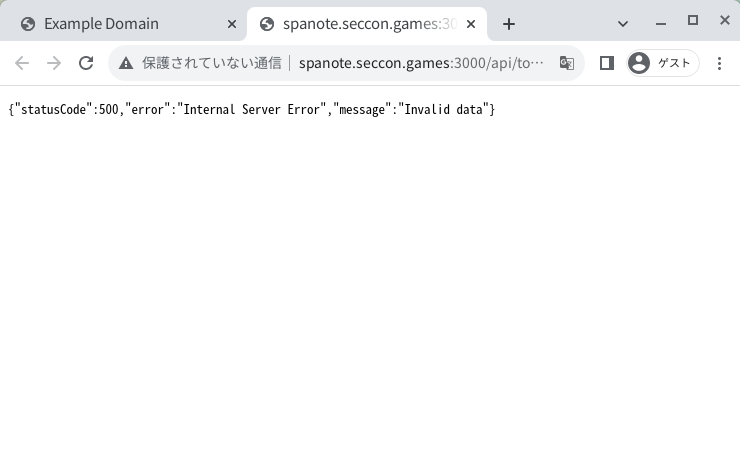
* The server returns a response with 500 status code.
3. In the opend tab, access `http://spanote.seccon.games:3000/`
* 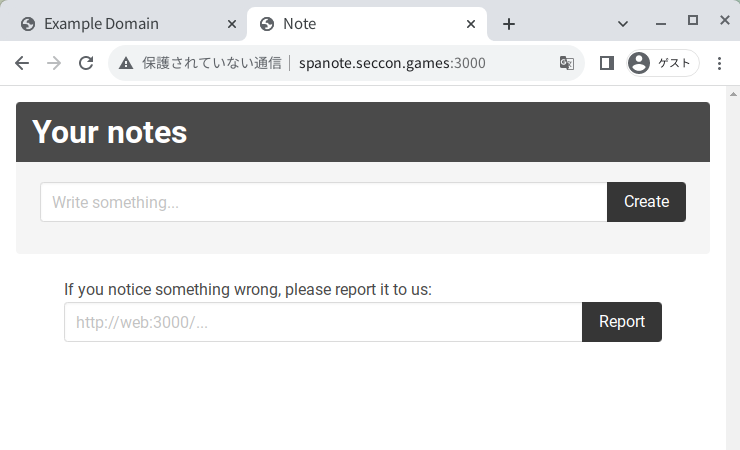
* Then, the response of `http://spanote.seccon.games:3000/api/token` is cached as a disk cache.
4. Execute `history.back()`
* 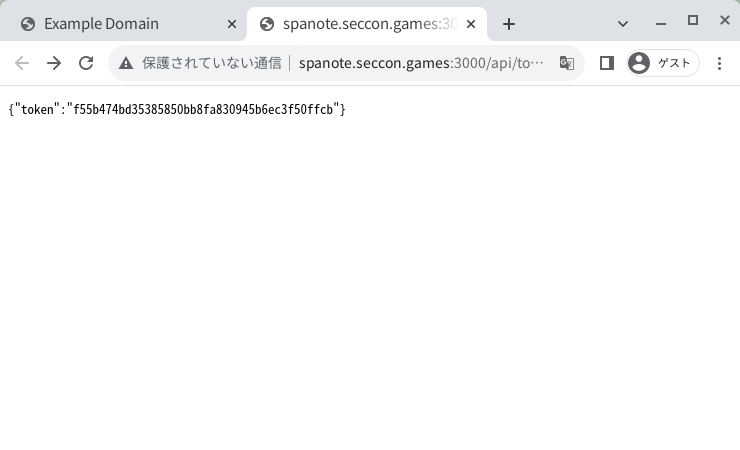
* The cached JSON response is rendered on the page!
You can confirm that disk cache is used using DevTools in Google Chrome:\

🎙️ HackTricks LIVE Twitch Wednesdays 5.30pm (UTC) 🎙️ - 🎥 Youtube 🎥
* Do you work in a **cybersecurity company**? Do you want to see your **company advertised in HackTricks**? or do you want to have access to the **latest version of the PEASS or download HackTricks in PDF**? Check the [**SUBSCRIPTION PLANS**](https://github.com/sponsors/carlospolop)!
* Discover [**The PEASS Family**](https://opensea.io/collection/the-peass-family), our collection of exclusive [**NFTs**](https://opensea.io/collection/the-peass-family)
* Get the [**official PEASS & HackTricks swag**](https://peass.creator-spring.com)
* **Join the** [**💬**](https://emojipedia.org/speech-balloon/) [**Discord group**](https://discord.gg/hRep4RUj7f) or the [**telegram group**](https://t.me/peass) or **follow** me on **Twitter** [**🐦**](https://github.com/carlospolop/hacktricks/tree/7af18b62b3bdc423e11444677a6a73d4043511e9/\[https:/emojipedia.org/bird/README.md)[**@carlospolopm**](https://twitter.com/carlospolopm)**.**
* **Share your hacking tricks by submitting PRs to the** [**hacktricks repo**](https://github.com/carlospolop/hacktricks) **and** [**hacktricks-cloud repo**](https://github.com/carlospolop/hacktricks-cloud).
---
# Agent Instructions: Querying This Documentation
If you need additional information that is not directly available in this page, you can query the documentation dynamically by asking a question.
Perform an HTTP GET request on the current page URL with the `ask` query parameter:
```
GET https://breached.gitbook.io/dashboard/pentesting-web/xss-cross-site-scripting/chrome-cache-to-xss.md?ask=
```
The question should be specific, self-contained, and written in natural language.
The response will contain a direct answer to the question and relevant excerpts and sources from the documentation.
Use this mechanism when the answer is not explicitly present in the current page, you need clarification or additional context, or you want to retrieve related documentation sections.