# Burp Suite Configuration for Android
🎙️ HackTricks LIVE Twitch Wednesdays 5.30pm (UTC) 🎙️ - 🎥 Youtube 🎥
* Do you work in a **cybersecurity company**? Do you want to see your **company advertised in HackTricks**? or do you want to have access to the **latest version of the PEASS or download HackTricks in PDF**? Check the [**SUBSCRIPTION PLANS**](https://github.com/sponsors/carlospolop)!
* Discover [**The PEASS Family**](https://opensea.io/collection/the-peass-family), our collection of exclusive [**NFTs**](https://opensea.io/collection/the-peass-family)
* Get the [**official PEASS & HackTricks swag**](https://peass.creator-spring.com)
* **Join the** [**💬**](https://emojipedia.org/speech-balloon/) [**Discord group**](https://discord.gg/hRep4RUj7f) or the [**telegram group**](https://t.me/peass) or **follow** me on **Twitter** [**🐦**](https://github.com/carlospolop/hacktricks/tree/7af18b62b3bdc423e11444677a6a73d4043511e9/\[https:/emojipedia.org/bird/README.md)[**@carlospolopm**](https://twitter.com/carlospolopm)**.**
* **Share your hacking tricks by submitting PRs to the** [**hacktricks repo**](https://github.com/carlospolop/hacktricks) **and** [**hacktricks-cloud repo**](https://github.com/carlospolop/hacktricks-cloud).
%20\(1\)%20\(2\).png)
\
Use [**Trickest**](https://trickest.io/) to easily build and **automate workflows** powered by the world's **most advanced** community tools.\
Get Access Today:
{% embed url="" %}
**This tutorial was taken from:** [**https://medium.com/@ehsahil/basic-android-security-testing-lab-part-1-a2b87e667533**](https://medium.com/@ehsahil/basic-android-security-testing-lab-part-1-a2b87e667533)
## Add a proxy in Burp Suite to listen.
Address: **192.168.56.1** & Port: **1337**
Choose ***All Interfaces*** option.
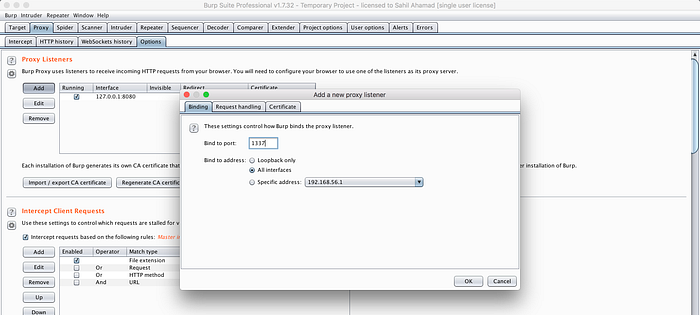
## **Adding listener in Android device.**
Setting → Wifi →WiredSSID (Long press)
Choose Modify network → Check Advance options.
Select Proxy to the manual

Testing connection over http and https using devices browser.
1. http\:// (working) tested —
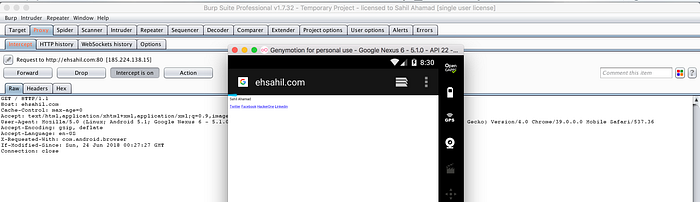
2\. https\:// certificate error —
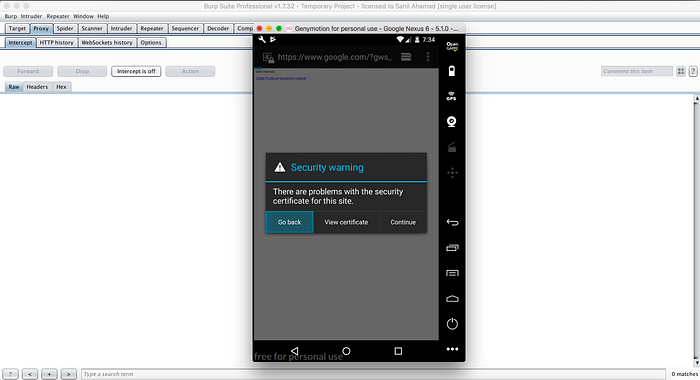
## **Installing burp certificate in android device.**
Download burp certificate. — Use your desktop machine to download the certificate.
[https://burp](http://burp)

Click on **CA certificate download the certificate.**
The downloaded certificate is in cacert.der extension and Android 5.\* does not recognise it as certificate file.
You can download the cacert file using your desktop machine and rename it from cacert.der to cacert.crt and drop it on Android device and certificate will be automatically added into **file:///sd\_card/downloads.**
**Installing the downloaded certificate.**
Settings →Security →Install certificate from SD cards
Now, goto: sdcard →Downloads → Select cacert.crt
Now, Name it as anything “portswigger”
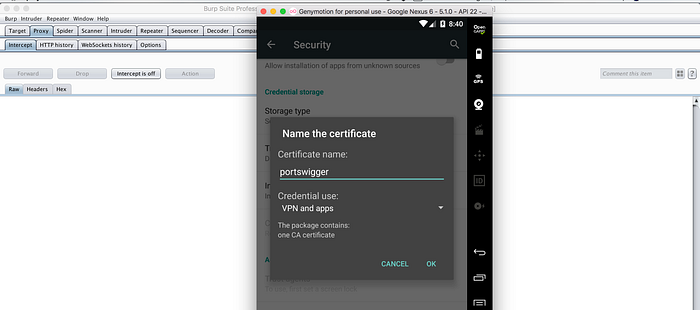
You also need to setup the PIN before adding certificate. Verifying the installed certificate using trusted certificates.
Trusted certificates →Users
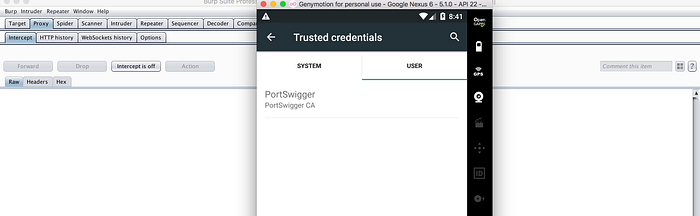
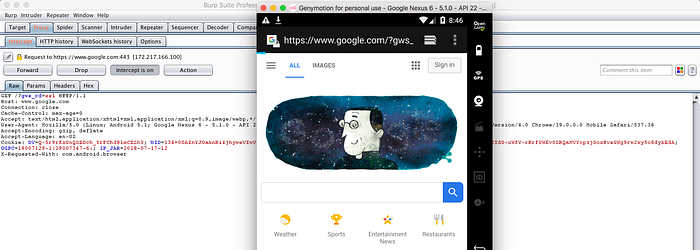
After installing Certificate SSL endpoints also working fine tested using →
{% hint style="info" %}
After installing the certificate this way Firefox for Android won't use it (based on my tests), so use a different browser.
{% endhint %}
%20\(1\)%20\(2\).png)
\
Use [**Trickest**](https://trickest.io/) to easily build and **automate workflows** powered by the world's **most advanced** community tools.\
Get Access Today:
{% embed url="" %}
🎙️ HackTricks LIVE Twitch Wednesdays 5.30pm (UTC) 🎙️ - 🎥 Youtube 🎥
* Do you work in a **cybersecurity company**? Do you want to see your **company advertised in HackTricks**? or do you want to have access to the **latest version of the PEASS or download HackTricks in PDF**? Check the [**SUBSCRIPTION PLANS**](https://github.com/sponsors/carlospolop)!
* Discover [**The PEASS Family**](https://opensea.io/collection/the-peass-family), our collection of exclusive [**NFTs**](https://opensea.io/collection/the-peass-family)
* Get the [**official PEASS & HackTricks swag**](https://peass.creator-spring.com)
* **Join the** [**💬**](https://emojipedia.org/speech-balloon/) [**Discord group**](https://discord.gg/hRep4RUj7f) or the [**telegram group**](https://t.me/peass) or **follow** me on **Twitter** [**🐦**](https://github.com/carlospolop/hacktricks/tree/7af18b62b3bdc423e11444677a6a73d4043511e9/\[https:/emojipedia.org/bird/README.md)[**@carlospolopm**](https://twitter.com/carlospolopm)**.**
* **Share your hacking tricks by submitting PRs to the** [**hacktricks repo**](https://github.com/carlospolop/hacktricks) **and** [**hacktricks-cloud repo**](https://github.com/carlospolop/hacktricks-cloud).
---
# Agent Instructions: Querying This Documentation
If you need additional information that is not directly available in this page, you can query the documentation dynamically by asking a question.
Perform an HTTP GET request on the current page URL with the `ask` query parameter:
```
GET https://breached.gitbook.io/dashboard/mobile-pentesting/android-app-pentesting/android-burp-suite-settings.md?ask=
```
The question should be specific, self-contained, and written in natural language.
The response will contain a direct answer to the question and relevant excerpts and sources from the documentation.
Use this mechanism when the answer is not explicitly present in the current page, you need clarification or additional context, or you want to retrieve related documentation sections.